



Subscribe to Bankless or sign in
Fluidkey is a new onchain privacy solution that is built on top of the  Ethereum Name Service (ENS) and
  Safe smart accounts. It's designed to offer users a seamless way to manage their funds securely and privately on Ethereum and other popular Layer 2 (L2) networks like Arbitrum, Base, and beyond.
This quick-start guide walks you through how to set up and use Fluidkey for private transactions, from creating your Fluidkey account to sending and receiving funds with the security of stealth addresses.
- Strategy: Create your first Fluidkey stealth address
- Goal: Receive and send crypto without compromising your onchain privacy
How to get started with Fluidkey
🛠️ Set up your Fluidkey account
- Connect your wallet: Head to app.fluidkey.com and connect your preferred crypto wallet (e.g., Metamask,
 Coinbase Wallet, Rainbow) or sign in with your email, Google, or
  Farcaster to generate a Privy wallet.
 - Set a PIN: After connecting, you'll be prompted to set a secure PIN number to protect your account from phishing attacks.
- Sign key generation message: This ensures your wallet generates the private keys needed to control your Fluidkey account.
- Sign authentication message: A final step to authenticate your wallet and start using Fluidkey securely.
🔍 Receiving private payments
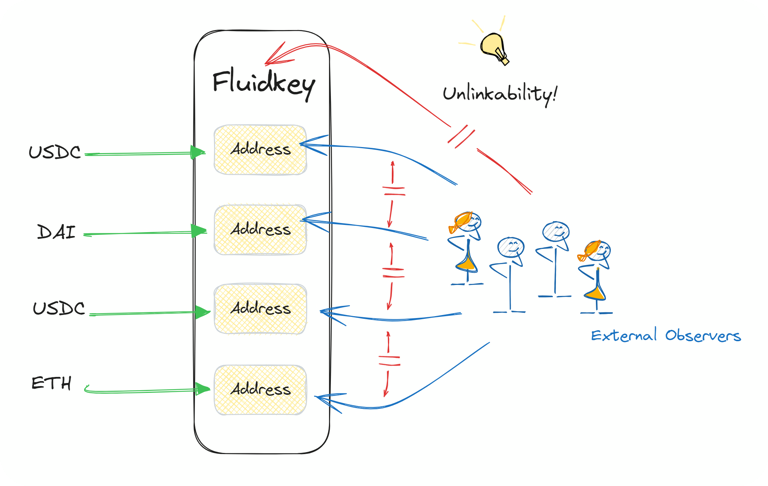
- Generate private addresses: Fluidkey automatically generates a new stealth address for every incoming transaction, keeping your funds private. You can use your provided
 ENS address (e.g. yourname.fkey.eth) to receive payments without linking to your public addresses. Under the hood, your Fluidkey ENS will resolve to new stealth addresses to avoid re-use.
 - Share your private ENS: Use your random fkey.eth ENS subname as a payment link, allowing others to send funds directly to your underlying stealth accounts.
- Track payments: Check all incoming payments in your Fluidkey dashboard. Fluidkey aggregates all stealth accounts into one unified view for easy management. Use the "Import" feature if you want visibility of tokens beyond ETH, USDC, and DAI.
💸 Sending private payments
- Select funds to send: Fluidkey automatically finds the stealth account(s) with the right balance for your transaction, or you can manually select which accounts to use with the "Labels" feature.
- Confirm the transaction: Enter the recipient's address and confirm the amount to send. Fluidkey optimizes the privacy of the transaction by ensuring stealth accounts are used.
- Complete the transaction: Confirm the transaction with your wallet, and that's it! That's how simple it is to make private payments with Fluidkey.
🧠 Best practices to maintain privacy
- Labels: Categorize your funds (e.g. personal, freelance, etc.) using labels to better manage which accounts are used when sending payments.
- Avoid revealing personal addresses: For maximum privacy, avoid sending funds directly to addresses publicly tied to your identity! If you do, you'll still have plausible deniability thanks to Fluidkey's stealth address system, but for the best results, keep your private funds in your Fluidkey account and only send out to external addresses that aren't publicly linked to you, like an exchange address.